How-to guide
How to Do the Crazy Frog AI Trend (Step by Step)
Updated 2026-10-15
Quick answer
Upload one clear photo of yourself, choose a scene, then generate the clip and post it with the trend sound picked from your app’s sound library. A friend’s photo puts two riders side by side. No prompt or editing skills are needed.
Change log
- First publication of this guide.
What you are making
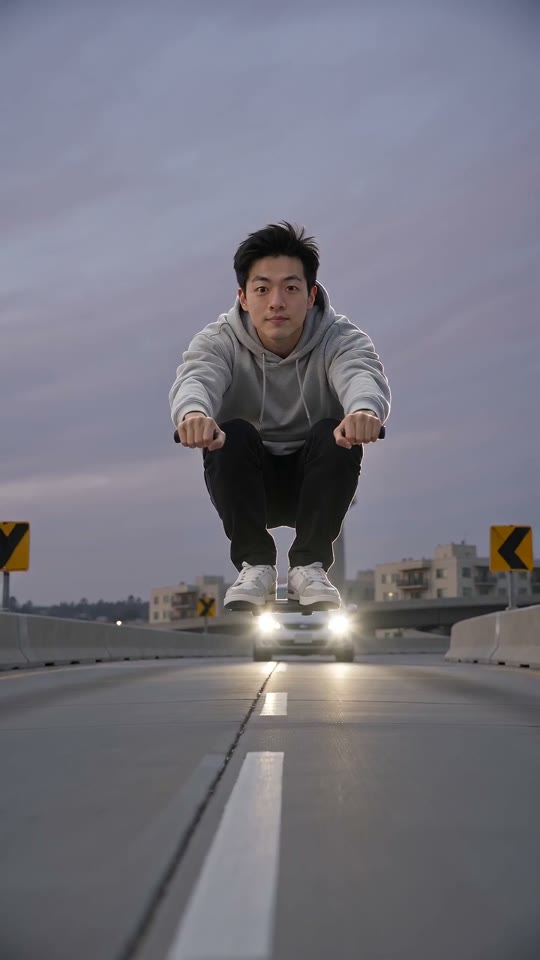
A short, fast-cut clip in which you hover in a low squat just above the road, fists out on invisible handlebars, and race along with a car on your tail. You look back at the car with a grin, then hit a bump and tumble into a harmless roll. That is the whole joke of the Crazy Frog AI trend: a perfectly serious riding pose with no moped underneath.
Step by step
- 1
Pick a photo: one adult, face visible, good light, ideally full body.
- 2
Add a second photo if a friend should ride with you.
- 3
Pick a scene: the retro game overpass at dusk, a city street by day, an open highway or a neon street at night.
- 4
Choose vertical for TikTok or widescreen, then generate the clip and download it when it is ready.
- 5
Post it and add the trend sound from your app’s sound library.
Getting a better result
Most problems come from the photo. If the face looks off, use a sharper, front-facing photo without sunglasses. If your clothes change, pick a photo where the full outfit is visible. If two friends look alike or swap places, use two separate solo photos rather than cropping one group shot. Busy backgrounds in the photo do not matter much, because the scene is replaced.
Posting it on TikTok, Reels or Shorts
Upload the downloaded clip, choose the trend sound in the app’s sound library and turn on the AI-generated label. Short captions work best: “no license, no problem”, “late for work again” or “he’s still chasing me”. Useful hashtags are #crazyfrogai, #crazyfrogtrend and #aivideo.
Want a free route first?
Editing-app templates and other AI tools offer free routes that take more effort. Read the free guide before you buy anything.
Start your chase
Upload a photo and make your clip.
Frequently asked questions
How many photos do I need for the Crazy Frog AI trend?
One photo is enough. Add a second photo only if a friend should ride next to you.
Do I have to write a prompt?
No. The scene, the pose and the chase are already set up. If you want to try other AI video apps, the prompt guide has prompts you can copy.
Why does my face look different?
Low light, filters, sunglasses or a side angle make the face harder to keep. Try a sharper, front-facing photo before generating.